
While there currently is no technology that I know of to stuff knowledge into my brain (now there’s a dream!), there are some CFA apps and resources that make studying for Chartered Financial Analyst exams easier. Most providers now include an app with their study resources to make studying on the go a little easier.
In this guide, we’ve gone through and tested the latest versions of CFA providers’ apps, so that you can see which would be useful for you.
Let’s go!
CFA Institute
CFA Learning Ecosystem App – Overview
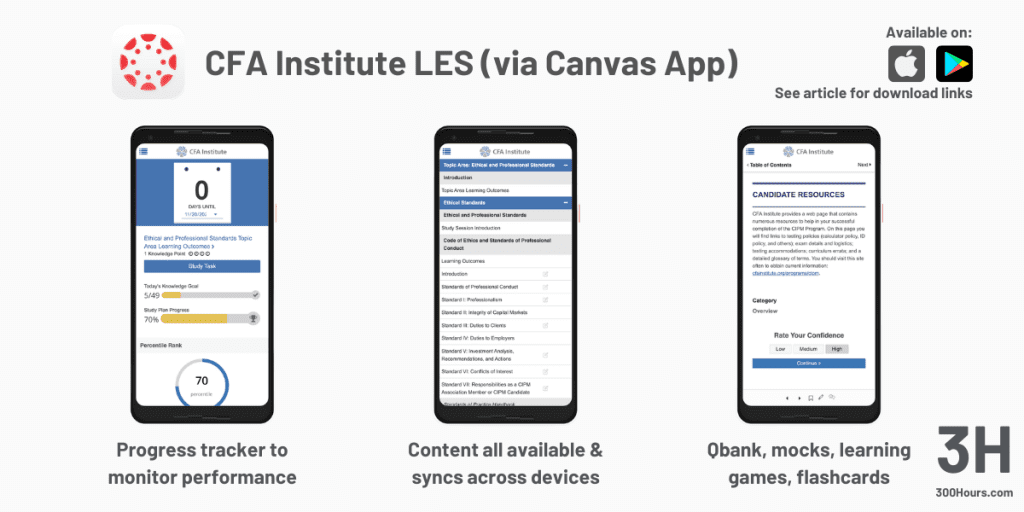
Since our last update, the way you access CFA Institute’s Learning Ecosystem on mobile has changed. You may still find CFA Institute apps listed under developers like Watermelon Express (iOS) or BenchPrep (Android), but these are outdated. The CFA Institute now officially directs candidates to access the LES via the Canvas Student app.
To set this up, you’ll need to log into your LES account on a desktop, navigate to the “Account” section, and scan a unique QR code to link your enrolment. It doesn’t just cover the CFA Program, but also CIPM and the Certificate in ESG Investing.
The app is still free, but only for enrolled candidates.
CFA Learning Ecosystem App – Features
- Full Curriculum Access: The complete CFA curriculum is accessible through the app. There are also additional features like a progress tracker to help you monitor your progress. Highlighting is still not supported in the mobile app interface – I hoped that this would have been added on from our last update, but no such luck.
- Practice Questions & Quizzes: Practice questions and quizzes is a format very well-suited for mobile. I found that with practice questions on the CFA Institute Learning Ecosystem app, getting additional practice on the go was quite easy. User-generated practice quizzes have now been added, allowing you to build custom sets based on specific topics you want to focus on.
- Practice Pack: If you’ve purchased the new CFA Program Practice Pack, those additional 1,000+ questions and extra mock exams will also sync directly to your mobile LES.
- Mock Exams: CFA Institute mock exams are also accessible through the app. Progress in mock exams sync up across your devices. In practice, I found that I much prefer taking the mock exams on my laptop. The point of a mock is to simulate an exam setting, and I find that taking bite-sized questions on my mobile defeats the point of a mock exam. The mobile screen is too small for the long vignettes found in Level 2 and 3, and you lose the exam-day experience by doing them on a phone.
- Games: I originally found the idea of CFA-based games to be, well, somewhat lame, but I’m happy to report that I found them much more useful than I expected. When you’re bored of practice questions and quizzes, this is a good way to continue brushing up on your knowledge but mix the format up a bit.
- Flashcards: Flashcards are another format that translates very well to mobile. In the CFA Institute Learning app, you can access pre-made flashcard sets, create your own, and even share your sets with others. There is also an option to print them out for some real-world use.
- Discussion: Just like the online Ecosystem, the CFA Learning Ecosystem app also includes access to discussion boards. You can search conversations and filter to find specific topics and questions.
CFA Learning Ecosystem App – Usability, UI/UX
Improved Stability: By using the Canvas Student infrastructure, the app is significantly more stable than the older BenchPrep versions. The older versions used to have crashing issues especially when switching apps, but this has been solved by migrating to Canvas Student.
Clunky login and logout issues: To access your content, you have to log in with your CFA Institute ID and password. Alternative mobile logins such as fingerprint, FaceID etc are not accessible, which makes login a little clunky. There have also been a lot of reports by frustrated users on issues with being logged out randomly. I did get logged out once myself when testing the app.
Where to download the CFA Learning Ecosystem App
You can get the CFA Institute Learning Ecosystem by downloading the Canvas Student app from the App Store or Google Play. Once downloaded, search for “CFA Institute” as your school/institution and follow the QR code prompt from your desktop LES account.
Kaplan Schweser

Kaplan Schweser App – Overview
The Kaplan Schweser app supports both CFA and FRM Kaplan Schweser packages. The mobile app focuses on offering an “on-the-go experience”, which includes access to QBank, SchweserNotes, Flashcards and Secret Sauce.
The app itself is free, although you would be required to have purchased the relevant Kaplan Schweser package to enable access to the content. If you’ve yet to purchase one, make sure you see if there are any offers available in our Offers section.
Kaplan Schweser App – Features
- SchweserNotes: Your SchweserNotes are accessible through the app. This used to be online-only, but SchweserNotes can now be downloaded for offline reading. This is especially handy for those who want to squeeze in some studying or revision while commuting. The reader also now supports dark mode and text resizing, making it much easier on the eyes during late-night sessions.
- QBank: Practice questions and quizzes is a format very well-suited for mobile, and QBank is one of the more useful aspects of the Kaplan Schweser app. You can build custom quizzes and see detailed explanations immediately. Full explanations are shown after you’ve answered, so you can quickly learn from any mistakes. The app uses a ‘one-tap’ answer system, which means it accepts your first tap as the answer, with no option to change it if you change your mind. The app also now features performance metrics that sync in real-time with your desktop, showing your strengths and weaknesses by topic.
- Video Integration: The app also has an enhanced video player for instructional videos. You can stream these or download them to watch offline, a highly requested feature by candidates.
- Flashcards: Flashcards are another format that translates very well to mobile. In the Kaplan Schweser app, you can:
- Access pre-made flashcard sets, identical to the ones you receive in print format. These cover all the CFA LOSes.
- There isn’t functionality to create your own flashcards or download, but as mentioned, candidates should already have a full set of printed flashcards when they purchased their Kaplan Schweser package.
- The flashcards are also searchable, making it very handy to zoom into specific topics and making studying a lot more efficient.
- Secret Sauce: If your package includes the Secret Sauce, it is fully integrated as a mobile-friendly digital book, perfect for the final-month high-level review.
Kaplan Schweser App – Usability, UI/UX
The Kaplan Schweser app is not rated well on both iOS and Android. On Android, I was unable to download the app in the official Google Play Store, but could side-load it as an APK.
My understanding is that the app itself is a wrapper for content, and although the content is updated, the app itself may have some issues.
While older reviews included crashing issues, the more recent updates have stabilized the experience. However, users still report occasional “sync lag” where quiz results take a few moments to update on the desktop dashboard.
Where to download the Kaplan Schweser App
You can get the Kaplan Schweser app from the App Store or Google Play.
UWorld CFA
UWorld CFA App – Overview
Since acquiring Wiley’s CFA prep business, UWorld’s app has transformed from a supplemental QBank into a full-scale learning platform. The app is no longer just for practice questions; it is a complete mobile classroom.
While the app is free to download, you’ll need an active subscription (Core, Advanced, or Elite) to log in. If you’ve decided on a provider yet, check out their offers in our Offers section.
Pro Tip: UWorld frequently offers free trial access, which is a great way to test the mobile interface before committing.
UWorld CFA App – Features
- Video & Study Guides: Video lectures and digital study guides are now fully integrated into the app. You can watch Peter Olinto’s lectures directly on your phone, with a picture-in-picture mode that lets you take notes simultaneously.
- Offline Study Mode: You can now download up to five video lectures at a time, as well as study notes and QBank sets, to work entirely offline – perfect for commutes.
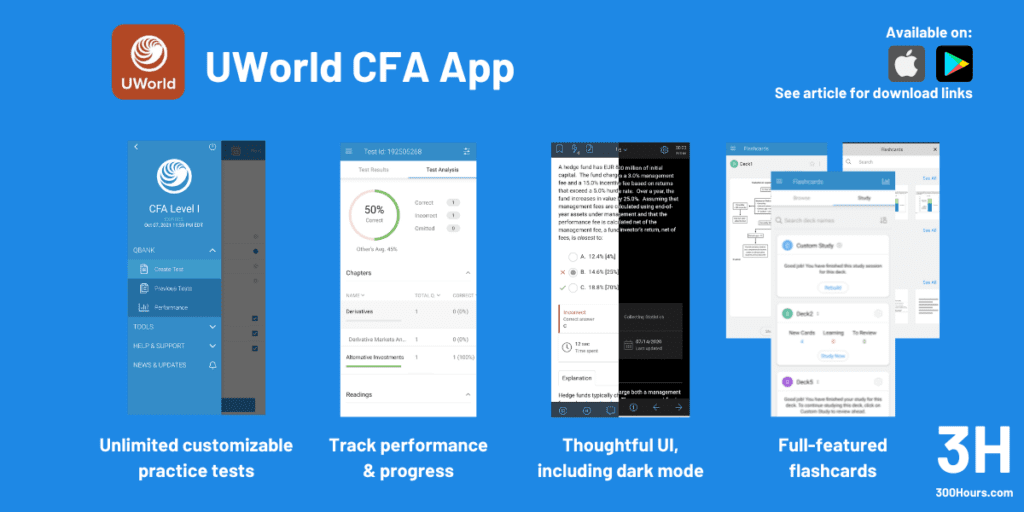
- User-friendly online exam interface: UWorld are very proud of their user interface efforts, which includes an option for dark mode, which is a much-requested feature among CFA study apps.
- 1,700+ instructive questions, unlimited customizable practice tests: UWorld’s product is a question bank, and you get access to their full range of questions through the app. These can be taken by creating practice tests that are fully customizable by topic, difficulty and history (e.g. repeated questions vs new questions).
- Detailed rationales for all answer choices: Another point that UWorld is particularly proud of is the thoroughness of their answer choices. Every question includes a mini-lesson with vivid color diagrams and charts that explain not just why “A” is right, but why “B” and “C” are wrong.
- Digital flashcards to customize study sets: The flashcard system has been upgraded to include ReadyDecks (pre-made sets) and a spaced-repetition algorithm. The app tracks which concepts you struggle with and surfaces those cards more frequently.
- MyNotebook: This feature allows you to highlight text in the curriculum or a QBank explanation and instantly clip it into a personal digital notebook that syncs across all devices.
UWorld CFA App – Usability, UI/UX
I found the UWorld app quite easy to use. You can cross out answer choices, highlight question text, add notes and create flashcards from snippets of questions.
You can also choose from a variety of color modes: regular (white), dark, gray and a beige-y one.
There is also a handy toolbar with things like calculator tips and currency codes, which could be useful to some candidates.
Setting up a test took no time at all, and I didn’t experience any lag or crash issues. Once I finished my test, this synced up immediately in my online account. The interface mimics the Prometric exam (as much as a mobile screen allows), helping you familiarize yourself as much as possible to the real exam-day experience.
The app now supports FaceID and TouchID as well. Overall the app felt well-built and fast. A new, highly visual dashboard shows your ‘Success Probability’ (hey, our study planner has that!) and breaks down your performance by topic, time spent per question, and how you compare to the global average.
Where to download the UWorld CFA App
You can get the UWorld CFA app from the App Store or Google Play.
IFT CFA Exam Prep
IFT CFA Exam Prep App – Overview
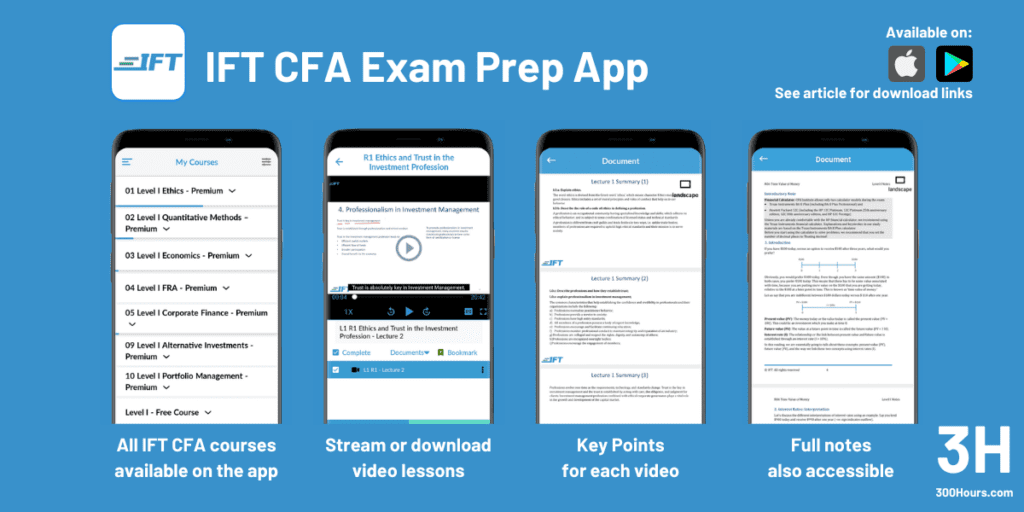
IFT (Arif Irfanullah) has been known for their clear, plain English explanations of complex concepts. Their app, which has been steadily refined since 2019, is primarily designed as a video player and document viewer.
As with most providers, the app is free to download, but premium content requires a paid package. IFT still offers a generous free trial that typically includes the full Quantitative Methods topic for Levels 1 and 2, and a curated selection of Learning Modules (LMs) and Pathway previews for Level 3 to let you test the experience.
The app includes access to study notes, formula sheets and all paid videos available for download and offline use.
IFT CFA Exam Prep App – Features
- Global Video Access: Premium subscribers can access every lecture video for their respective level. English subtitles are now included for all Level 1 videos (with L2 and L3 subtitles rolling out), enabling full clarity of explanations, and ease of studying in quiet public spaces.
- Mastering Offline Study: IFT allows you to download both videos and study notes directly to your device. This includes everything from summary slides to formula sheets.
- Resume & Progress Tracking: The app features a Netflix-like resume function that syncs with the IFT Learning Portal. If you stop a video halfway through on your laptop, you can pick it up at the exact second on your phone during your commute.
- Active Learning (AL) & Quizzes: Every video is paired with “Active Learning” features. After watching a lecture, you can immediately dive into a PDF summary and a topic-specific quiz. The app also hosts IFT’s full Multiple Choice Question (MCQ) Q-bank, allowing for quick-fire practice sessions.
- High-Yield Course Access: If you have the High-Yield package, those condensed videos and Key Facts notes are also accessible via the app, which is perfect for the final cram phase in the last 4–6 weeks before the exam.
IFT CFA Exam Prep App – Usability, UI/UX
The IFT app has garnered great review ratings across iOS and Android, and it shows. The app is smooth, fast, responsive and accessing content is easy.
If you look at user reviews you do see sporadic reports of bugs, but I didn’t experience any while testing the app, and overall I felt the app was exceedingly well built.
Where to download the IFT CFA Exam Prep App
You can get the IFT CFA Exam Prep app from the App Store or Google Play.
Mark Meldrum (Cerifi)
Mark Meldrum App – Overview
Mark Meldrum (now a part of Cerifi) is generally known for his high-quality video lectures. The Mark Meldrum app is hence designed around video lecture playability – and it does it well.
The app is free to download, but you must have a paid account at MarkMeldrum.com to access content. Like IFT, Mark Meldrum offers a Free Trial that allows you to sample specific sections (usually the Ethics or Quant modules) to see if his teaching style works for you.
Mark Meldrum App – Features
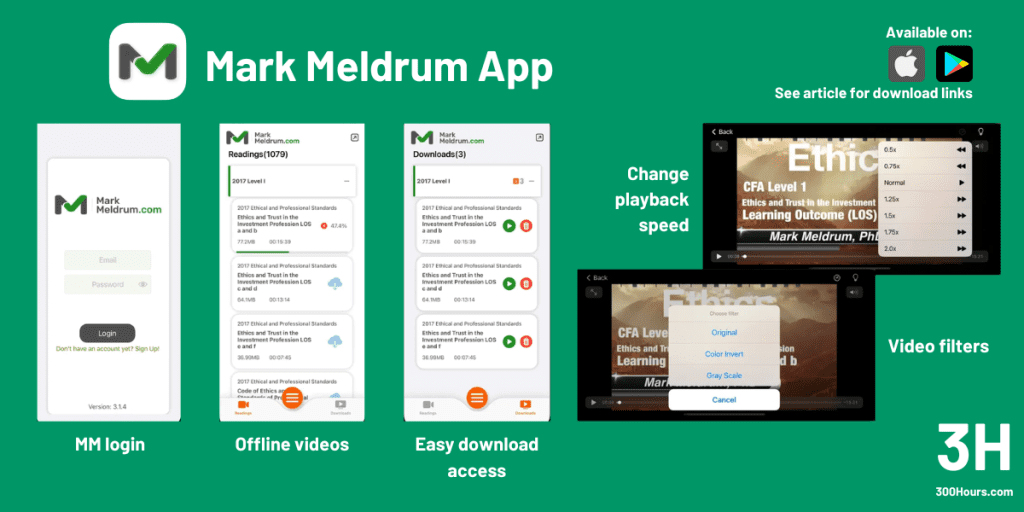
- Video Access, including offline: The Mark Meldrum app allows you to download almost any video to your device, including Reading Videos, EOC Walkthroughs, and Seminars. Providers can be quite protective over offline content, so it’s nice to see this generous offline policy.
- Media Controls: The player includes speed controls (from 0.5x to 2.0x). Personally I rarely use these kinds of features, but I know that many candidates and video viewers today do to get through the material faster.
- Archiving: A unique feature is that once your package expires, your “Archive” (reading videos from previous levels) is accessible through the app for three years. This would be incredibly useful for Level 2 and 3 candidates who need to quickly refresh their memory on, say, a Level 1 concept.
- Audio-Only Mode: The app supports background playback and lock-screen controls. This means you can listen to a 2-hour lecture on Derivatives like a podcast while driving or at the gym, without having to keep your screen on and drain your battery. In practice, I found this works well on some topics like Ethics and Economics, but less so for maths-focused topics.
- Picture-in-Picture: For those studying on iPads or larger phones, the app supports native picture-in-picture. You can have a lecture playing in a small floating window while you scroll through the official CFAI curriculum or take notes in another app.
- PDF Notes Viewer: You can view the lecture PDF notes directly within the app. These are the exact slides used on screen, allowing you to follow along without needing to print out hundreds of pages.
Mark Meldrum App – Usability, UI/UX
The Mark Meldrum app is primarily for videos, and PDFs. While you can access some quiz elements, the full study experience is still significantly better on a desktop. This isn’t a flaw but rather a design choice to keep the app fast and focused.
Where to download the Mark Meldrum App
You can get the Mark Meldrum app from the App Store or Google Play.
Hope you found the above useful for your CFA study preparations. If you have any recommendations, let us know in the comments and we’ll add them to this list!
Meanwhile, here are some related articles which may be of interest: